
Access control in Runwell Docs and Files is built on a few simple concepts. Here's a quick overview before you move on to the more detailed articles.
Owner, editor, and viewer
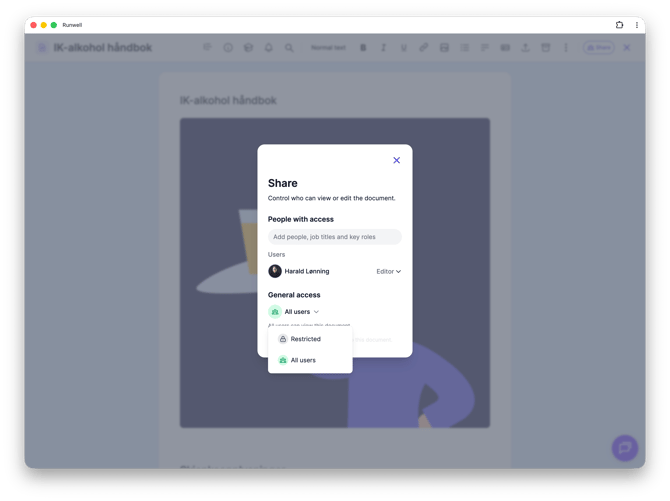
The person who created the document is automatically an editor, and has full access. Everyone else you give access to gets a role, such as Editor (can change the content) or view-only access. All users with Owner Access in Runwell have full access to the document. You find and change roles under Share in the document, in the list under Users.
All users or restricted
Under General access in the Share window, you choose whether the document should be open to All users at the location or in the organization, or Restricted to specific people, job titles, or key roles that you add yourself.
File, Master, and Template — three ways to share
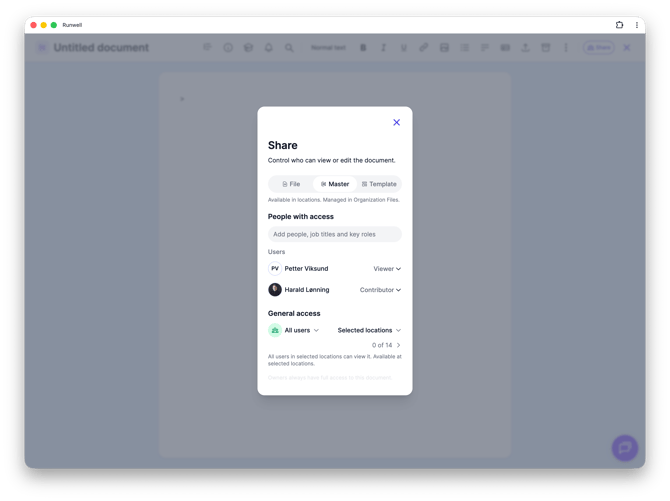
In Organization files, every document has three tabs in the Share window:
File keep the document in Organization Files only — you decide who can see and edit the document itself, just like at a location document.
Master makes the document available out at the locations, either as one shared document that applies to all (or selected) locations, or as a placeholder where each location uploads its own.
Template puts the document in the Template Center, where locations can grab their own copy and make it their own — without staying linked to the original.
Which locations
When you share as a Master, you also choose whether it should apply to All locations (including new ones you add later) or only Selected locations.
Want more detail? See the separate articles on who can see which documents, sharing to all current and future locations, sharing with selected people, and who can edit.
Don't hesitate to reach out to our customer service if you have any questions 🤩