
This only applies to documents in Organization files, and requires organization-level access and Pro plan.
A master document is documentation you control from the organization, made automatically available out at your locations. There are two variants, depending on whether every location should have the same content, or its own.
One shared document for every location
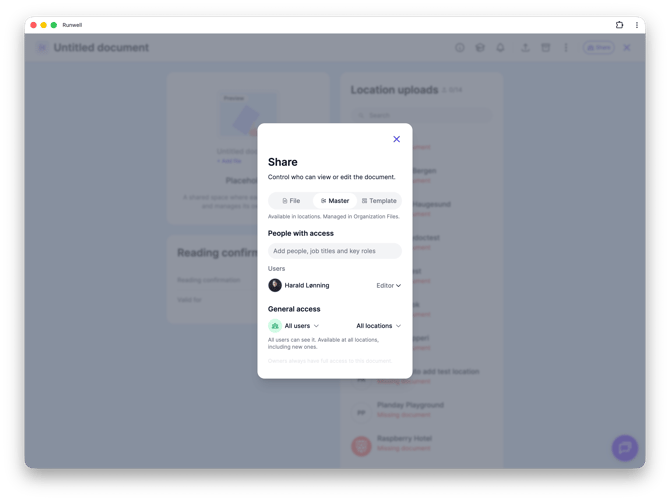
Use this when every location should have exactly the same content — for example an employee handbook or a set of workplace regulations. Write or upload the document in Organization files, click Share, and choose the Master tab.
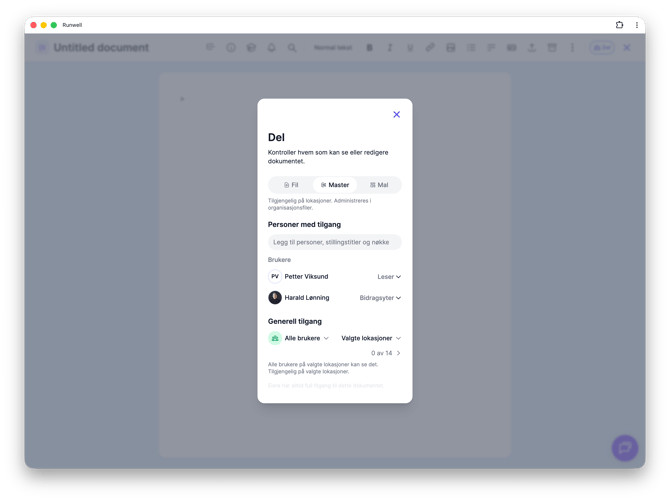
Choose whether it should apply to All locations or Selected locations. From now on, locations see the document exactly as it is — and when you update the original in Organization files, the change automatically carries out to every location with access.
A shared space where each location uploads its own
Use this when you want to require each location to submit its own version of a document — for example its own liquor license or its own fire safety documentation — and want to track who has submitted. Click Add new file and choose Placeholder, then click make it a Master on the placeholder's page.
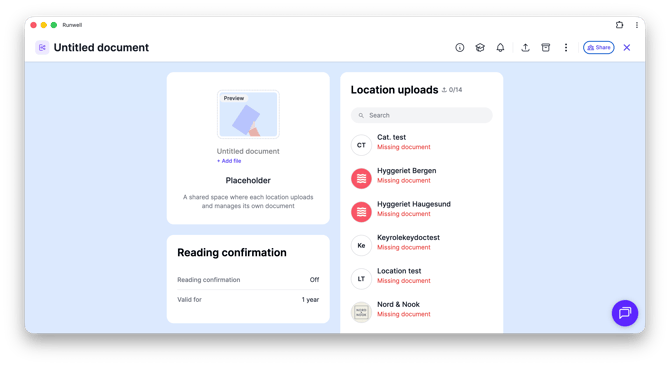
Here, there's no single piece of content being shared out — instead, each location is required to deliver its own, and a status card shows how many have done so. See the article on location upload status for the details.
Don't hesitate to reach out to our customer service if you have any questions 🤩